
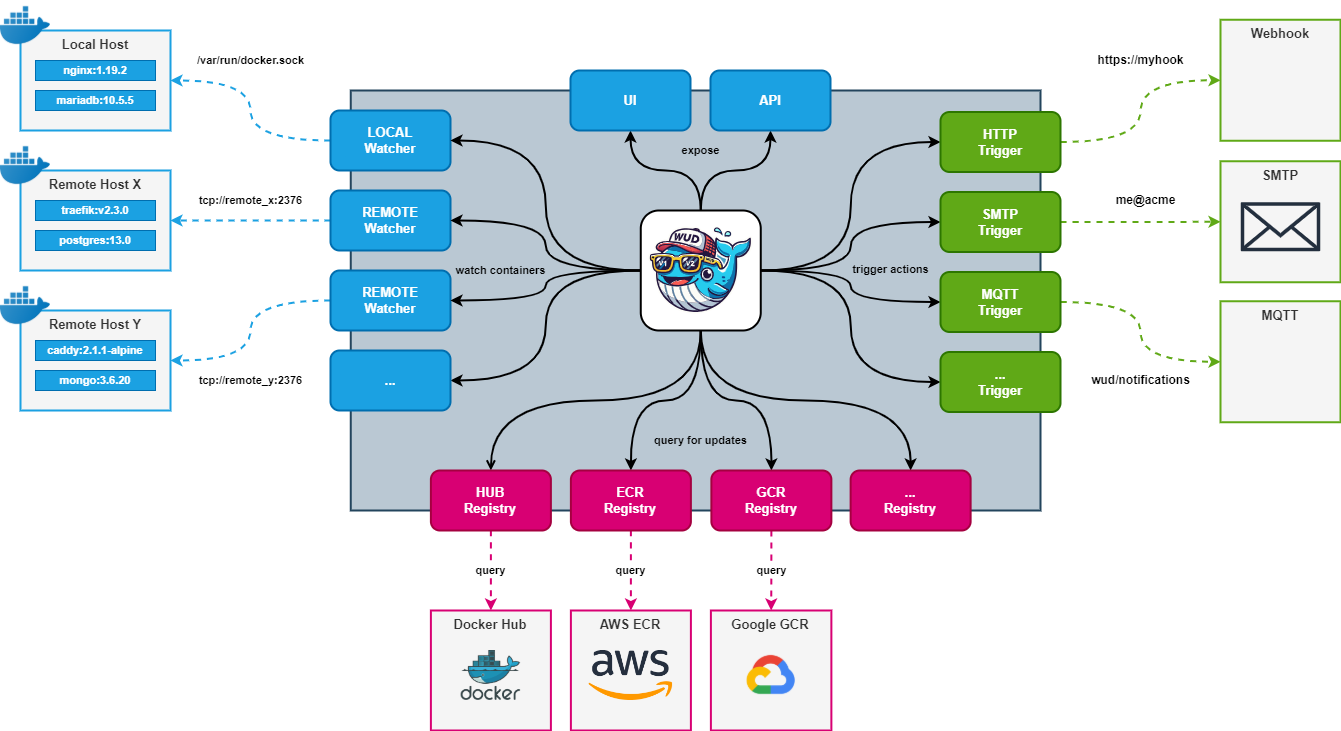
Managing multiple Docker hosts can become tricky, especially when trying to track which containers are outdated. What’s Up Docker (WUD) solves this by checking for image updates.
This technical guide shows how to implement WUD in a multi-host environment using two separate methods:
- 🔌 TCP without TLS (unsecured, only for internal networks)
- 🔒 TCP with TLS (secure, production-ready)
🧰 Requirements
Before starting, ensure you have:
- A Linux-based server to act as the WUD Master Node
- Remote Docker hosts to be monitored (Ubuntu/Debian recommended)
- Docker Engine ≥ 20.x on all nodes
- Basic
openssltools to generate TLS certificates (optional but recommended)
Optional but useful:
- Docker Compose
- Access to port
2375(TCP) and/or2376(TLS) - Shell or SSH access to all Docker hosts
🧱 Step 1: Install the WUD Master Server
On your monitoring server (e.g. 192.168.69.250), deploy WUD via Docker Compose:
1
2
3
4
5
6
7
8
9
10
11
12
13
14
15
version: '3.8'
services:
  whatsupdocker:
    image: ghcr.io/getwud/wud:8.0.1
    container_name: wud
    restart: always
    ports:
      - 3000:3000
    volumes:
      - ./certs:/certs:ro
      - /var/run/docker.sock:/var/run/docker.sock
    environment:
      - WUD_LOG_LEVEL=info
      - WUD_WATCHER_LOCAL_SOCKET=/var/run/docker.sock
      # Add TCP or TLS watchers here as needed
Start the service:
1
docker compose up -d
Visit the WUD dashboard at: http://<WUD_IP>:3000
This setup will monitor containers on the local host as well.
🖧 Method 1: Expose Docker over TCP (No TLS)
Use this for trusted internal networks only.
🛠 Modify Docker Daemon on Remote Node
On the remote host (e.g. 192.168.69.249):
1. Edit /etc/docker/daemon.json:
1
2
3
{
  "hosts": ["unix:///var/run/docker.sock", "tcp://0.0.0.0:2375"]
}
2. (Important) Remove default Docker systemd flags to avoid conflicts:
By default, Docker may start with the -H fd:// flag, which conflicts with the hosts entry in daemon.json.
To fix this, create an override for the Docker systemd service:
1
2
sudo mkdir -p /etc/systemd/system/docker.service.d
sudo nano /etc/systemd/system/docker.service.d/override.conf
Paste the following into the file:
1
2
3
[Service]
ExecStart=
ExecStart=/usr/bin/dockerd
Save and exit the editor.
3. Reload systemd configuration:
1
sudo systemctl daemon-reload
4. Restart Docker:
1
sudo systemctl restart docker
5. (Optional) Check Docker status:
1
sudo systemctl status docker
6. (Optional) Review logs if any issues:
1
journalctl -xeu docker.service
📡 Add Watcher to WUD Master
Append to the master’s environment: section in docker-compose.yml:
1
      - WUD_WATCHER_MYREMOTEHOST_HOST= # IP or DNS name of host
Apply the changes:
1
docker compose up -d
Security note: Exposing Docker over TCP without TLS (as in this example) is insecure. Use this only in trusted environments or restrict to
127.0.0.1and use SSH tunneling for remote access.
🔐 Method 2: Secure Docker TCP with TLS
This is the recommended method for production or exposed environments.
🔑 Generate TLS Certificates
On the remote Docker host:
1
mkdir ~/docker-certs && cd ~/docker-certs
⭐ CA
1
2
openssl genrsa -aes256 -out ca-key.pem 4096
openssl req -new -x509 -days 365 -key ca-key.pem -sha256 -out ca.pem
⭐ Server cert
1
openssl genrsa -out server-key.pem 4096
openssl req -subj "/CN=$(hostname)" -new -key server-key.pem -out server.csr
ℹ️ NOTE:
Instead of $(hostname) in the CN field, you should enter the host’s IP address or DNS name under which Docker will be accessible remotely (e.g., 192.168.69.249 or docker-host.local).
Example of automatically retrieving the IP:
1
2
 IP=$(hostname -I | awk '{print $1}')
 openssl req -subj "/CN=$IP" -new -key server-key.pem -out server.csr
If you want to use a DNS name:
1
 openssl req -subj "/CN=docker-host.local" -new -key server-key.pem -out server.csr
Sign the certificate signing request (CSR) using your CA’s certificate and private key to generate a server certificate valid for 365 days with SHA-256 encryption:
1
2
openssl x509 -req -days 365 -sha256 -in server.csr -CA ca.pem -CAkey ca-key.pem \
  -CAcreateserial -out server-cert.pem
⭐ Client cert
1
2
3
4
5
6
7
openssl genrsa -out client-key.pem 4096

openssl req -subj "/CN=client" -new -key client-key.pem -out client.csr
echo extendedKeyUsage = clientAuth > client-extfile.cnf

openssl x509 -req -days 365 -sha256 -in client.csr -CA ca.pem -CAkey ca-key.pem \
  -CAcreateserial -out client-cert.pem -extfile client-extfile.cnf
⭐ Set permissions:
1
2
chmod 400 ca-key.pem server-key.pem
chmod 444 ca.pem server-cert.pem
🔧 Docker Daemon TLS Config
Create or modify /etc/docker/daemon.json:
1
2
3
4
5
6
7
8
{
  "tls": true,
  "tlsverify": true,
  "tlscacert": "/etc/docker/certs/ca.pem",
  "tlscert": "/etc/docker/certs/server-cert.pem",
  "tlskey": "/etc/docker/certs/server-key.pem",
  "hosts": ["unix:///var/run/docker.sock", "tcp://0.0.0.0:2376"]
}
Move certificates:
1
2
3
sudo mkdir -p /etc/docker/certs
sudo cp *.pem /etc/docker/certs
sudo systemctl restart docker
🧩 Configure WUD Master for TLS
On the WUD master, prepare client certs (ca.pem, client-cert.pem, client-key.pem) and store them in ./certs/.
Then extend the environment block:
1
2
3
4
5
6

      - WUD_WATCHER_MYREMOTEHOST_HOST= # IP or DNS name of host - matching CN in the server certificate
      - WUD_WATCHER_MYREMOTEHOST_PORT=2376
      - WUD_WATCHER_MYREMOTEHOST_CAFILE=/certs/ca.pem
      - WUD_WATCHER_MYREMOTEHOST_CERTFILE=/certs/client-cert.pem
      - WUD_WATCHER_MYREMOTEHOST_KEYFILE=/certs/client-key.pem
ℹ️ NOTE:
The value of WUD_WATCHER_MYREMOTEHOST_HOST must match the Common Name (CN) used in the server certificate.
- If the CN was set to a hostname (e.g. docker-node1.local), use the same DNS name here.
- If the CN was set to an IP address, use that exact IP here.
Restart the container:
1
docker compose up -d
✅ Verifying Setup
Verify TLS connection:
- Open
http://<WUD_MASTER>:3000 - You should see containers from the local host and remote host (NODE)
- Check logs via
docker logs wudfor watcher registration - Verify TLS connection:
1
2
3
4
openssl s_client -connect 192.168.69.249:2376 \
    -CAfile certs/ca.pem \
    -cert certs/client-cert.pem \
    -key certs/client-key.pem
🛡 Security Considerations
| Feature | TCP (No TLS) | TCP with TLS |
|---|---|---|
| Encrypted | ❌ | ✅ |
| Authentication | ❌ | ✅ (certs required) |
| Safe for public | ❌ NEVER | ✅ If firewall protected |
- Always use TLS in untrusted or internet-facing environments
- Use firewalls to restrict TCP ports (2375/2376)
- Rotate TLS certificates regularly
🧪 Optional: Add Prometheus Metrics
Expose WUD metrics at /metrics:
1
      - WUD_PROMETHEUS_ENABLED=true
🧼 Cleanup
To stop WUD:
1
docker compose down
To remove Docker TCP endpoint:
1
2
3
sudo nano /etc/docker/daemon.json
# Remove tcp://0.0.0.0:2375 or :2376
sudo systemctl restart docker
🏁 Conclusion
WUD is a powerful solution to monitor outdated containers across multiple Docker hosts. Whether you’re securing your setup with TLS or quickly prototyping with TCP, you now have a reliable multi-host monitoring system.
📚 Resources:
Happy monitoring! 🚢