
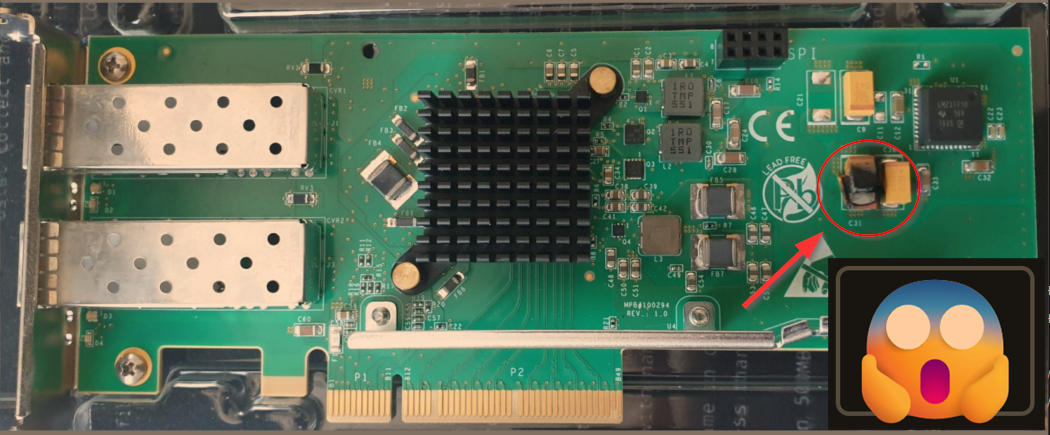
🔥 Unfortunately, the new network card decided to commit seppuku the moment I turned on the server.. 🔥
While upgrading one server, I decided to install a brand new network card with two SFP+ ports — the goal was to add 25 GbE connectivity and improve overall performance. Unfortunately, instead of a smooth upgrade, I ran into a serious hardware failure…
As soon as I powered on the server, I heard a distinct pop and immediately noticed the smell of burnt plastic. The system didn’t boot, and after removing the card, I found clear burn marks near the power regulation components on the PCB.
It appears that the card suffered a critical failure right at first power-up — possibly due to a manufacturing defect or internal short circuit.
What to Do in a Situation Like This?
1️⃣ Immediately disconnect power – If you hear a pop or smell something burning, shut down everything right away.
2️⃣ Visually inspect the card – Look for burn marks, discoloration, melted plastic, or damaged components.
3️⃣ Document everything – Take photos and write a description of what happened, especially if you plan to file a warranty claim.
4️⃣ Avoid testing the card in another machine – A damaged card can potentially harm other systems.
5️⃣ Contact the seller or manufacturer – Providing a detailed explanation with images helps your chances in a warranty or RMA process.
6️⃣ Use proper power protection – Consider using a good surge protector or a UPS with proper power filtering for sensitive hardware.
Lessons Learned
Even brand-new hardware can fail right out of the box. This experience serves as a reminder that upgrades should be done carefully and ideally step-by-step, especially when high-power or critical components are involved.
If anyone has experienced something similar — feel free to share in the comments!